Symlink, Clone, Leak: The Three-Word Story of CVE-2026-44881
Portainer trusted go-git. go-git trusted the blob mode. Nobody checked where the symlink was pointing.
Table of Contents
- Introduction
- Background
- Vulnerability Analysis
- Lab Reproduction (PoC)
- Impact & Affected Versions
- Remediation & Mitigation
- Disclosure Timeline
- References
1. INTRODUCTION
It started with a single git commit.
No shellcode. No memory corruption. No zero-day exploit chain requiring
a PhD to understand. Just a Git repository with one carefully crafted
file — a symlink blob with mode 0120000 — pushed to a server and
pointed at a Portainer stack deployment.
Thirty seconds later, the contents of /etc/shadow appeared in an API
response. Clean. Plaintext. No alarms triggered.
That is CVE-2026-44881.
Portainer CE’s Git-backed stack feature allows users to deploy Docker
Compose configurations directly from a remote Git repository. Under the
hood, Portainer calls go-git to clone the repository onto the host
filesystem, then serves the resulting files back through its REST API.
The problem: go-git faithfully translates Git’s symlink blob mode into a
real OS-level symlink on disk — and Portainer never checks where that
symlink is pointing before following it. Point it at /etc/passwd. Point
it at ~/.ssh/id_rsa. Point it at /run/secrets/db_password. The API
will read it and hand it back to you in a 200 OK response.
The CVSS base score is 9.9 CRITICAL. The exploit requires only a valid Portainer account and the ability to create or update a Git-backed stack — a permission granted to non-admin users by default. No special tooling is needed. The entire attack fits in a shell script.
This post covers everything: how the vulnerability works at the code level, a full step-by-step lab reproduction, which versions are affected, and exactly what you need to do to remediate or detect it in your environment.
2. BACKGROUND
2.1 What is Portainer CE?
Portainer Community Edition is a lightweight, browser-based management UI for Docker and Kubernetes. It strips away the complexity of the command line and gives DevOps teams, developers, and infrastructure managers a visual dashboard to deploy containers, manage networks, inspect logs, and handle orchestration tasks — all through a clean web interface.
Portainer is widely adopted in self-hosted environments, on-premise data centers, and cloud deployments. It’s popular because it’s easy to set up, doesn’t require deep Docker/Kubernetes knowledge, and works with a single docker run command.
Example - Launch Portainer CE:
docker run -d \ -p 8000:8000 -p 9443:9443 \ -v /var/run/docker.sock:/var/run/docker.sock \ portainer/portainer-ce:latestOnce running, you point your browser to https://localhost:9443, create an admin account, and you have a full container management platform. It handles everything from image pulls to volume mounts to stack deployments.
One critical detail: Portainer typically runs as root inside the container and has access to the host’s Docker socket. This means Portainer processes have broad permissions over the host’s filesystem and container runtime. This detail becomes important when understanding the impact of CVE-2026-44881.
2.2 What is a Git-Backed Stack?
A Git-backed stack is a Portainer feature that lets you define your infrastructure in code — specifically, in a docker-compose.yml file stored in a Git repository — and have Portainer automatically deploy it.
Instead of manually uploading or editing a Compose file through the UI, you simply point Portainer to a Git repository URL, specify the branch and the Compose file path, and Portainer handles the rest:
- Clone the Git repository to the host
- Pull the specified Compose file
- Deploy the stack based on that file
- Redeploy automatically when the repository is updated (optional auto-pull feature)
This is infrastructure-as-code in action. Your entire stack lives in Git, and Portainer is just the deployment orchestrator.
2.3 How Git-Backed Stacks Work: The Filesystem Touch Point
Here’s the critical part. When you create a Git-backed stack, Portainer doesn’t just read the Compose file directly from the remote Git server. Instead, it:
- Clones the entire repository locally to a temporary directory on the host filesystem (typically /data/portainer/stacks/{stack-id}/ or similar)
- Reads the Compose file from that local cloned directory using the file system API
- Parses and deploys the stack based on the Compose configuration
- Stores the clone for future reference and re-deployment
This workflow makes sense from an engineering standpoint. It’s faster to read from local disk than to pull from a remote server every time you need to inspect or redeploy the stack. It also allows offline operation if the Git server becomes temporarily unavailable.
The problem: this cloning and on-disk storage of untrusted Git repositories opens a filesystem attack surface.
2.4 The Attack Surface: Git Blob Modes
Git repositories don’t just store files as blobs of data. Every file in a Git repository has a mode — a numeric permission and type indicator. Here are the common ones:
| Mode | Type | Example |
|---|---|---|
| 100644 | Regular file (rw-r—r—) | docker-compose.yml |
| 100755 | Executable file (rwxr-xr-x) | ./deploy.sh |
| 120000 | Symbolic link (symlink) | → /etc/passwd |
| 160000 | Gitlink / submodule | submodule reference |
When go-git (the library Portainer uses) clones a repository, it faithfully recreates every file with the exact mode specified in the Git metadata. This includes symlinks.
A symlink with mode 120000 in Git is a pointer to another file. In the Git metadata, the symlink target is stored as a blob object. When go-git clones the repository to disk, it calls os.Symlink(target, path) to create that symlink on the host filesystem.
For example, if a malicious Git repository contains a file called docker-compose.yml with mode 120000 pointing to /etc/passwd, when Portainer clones that repository, it creates a real OS-level symlink on the host:
/data/portainer/stacks/42/docker-compose.yml → /etc/passwdThis symlink lives on the host filesystem, pointing outside the stack directory to a sensitive file. And here’s the vulnerability: Portainer never validates or sanitizes the symlink target before creating it.
2.5 The Read Path: Where the API Enters
Once the stack is cloned, Portainer exposes the stack contents through its REST API. Specifically, there’s an endpoint:
GET /api/stacks/{stack-id}/fileThis endpoint is meant to let users retrieve the Compose file for a stack (for inspection or editing). It simply calls os.ReadFile(stackPath + “/docker-compose.yml”).
Under the hood, os.ReadFile() is symlink-aware. It follows symlinks. So if docker-compose.yml is actually a symlink pointing to /etc/passwd, calling os.ReadFile() on it will read /etc/passwd instead.
The API returns the file contents in the response:
{ "StackFileContent": "root:x:0:0:root:/root:/bin/bash\n..."}And just like that: arbitrary file read.
2.6 Why This Matters: The Attack Surface Summary
To summarize the attack surface:
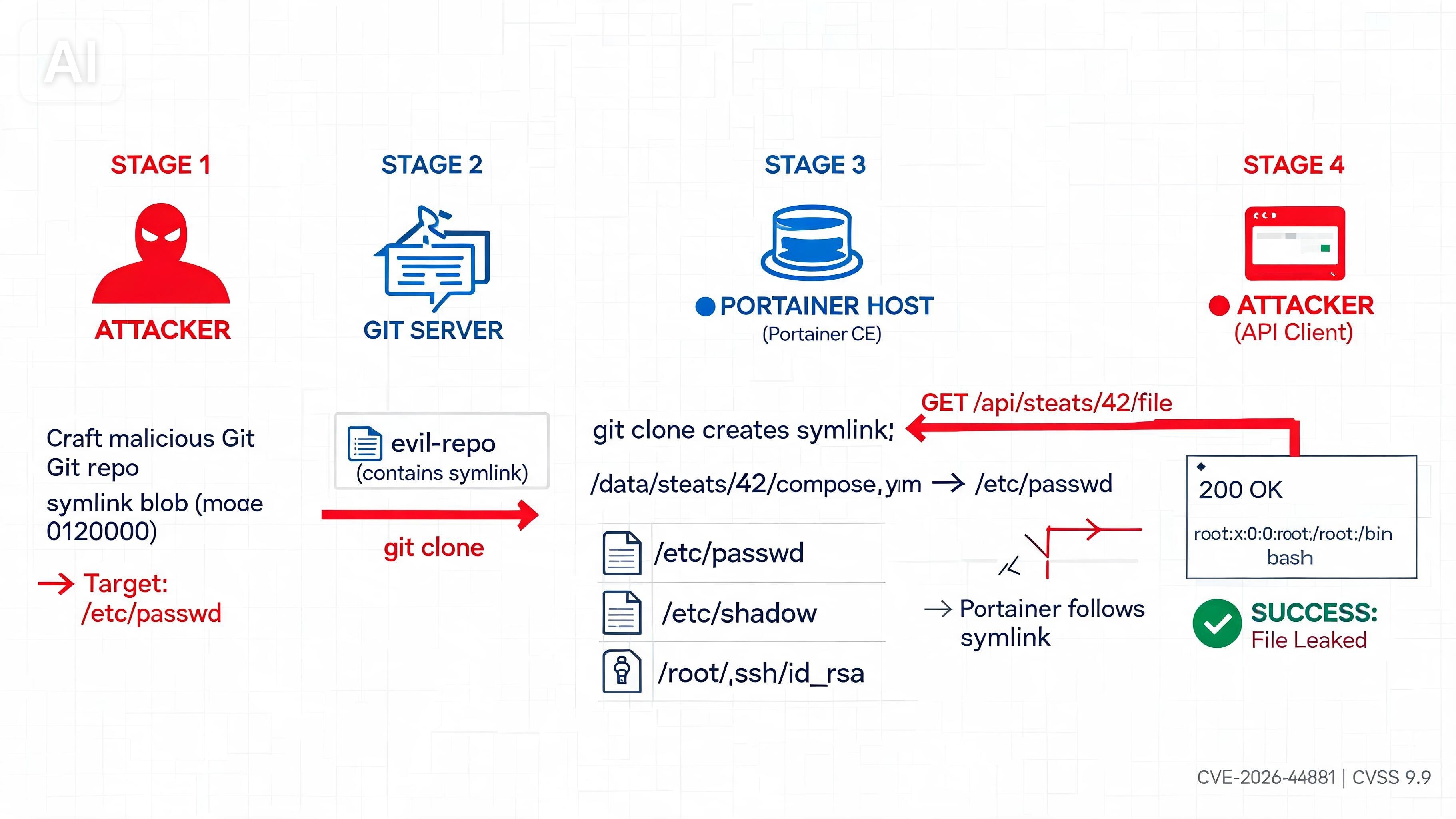
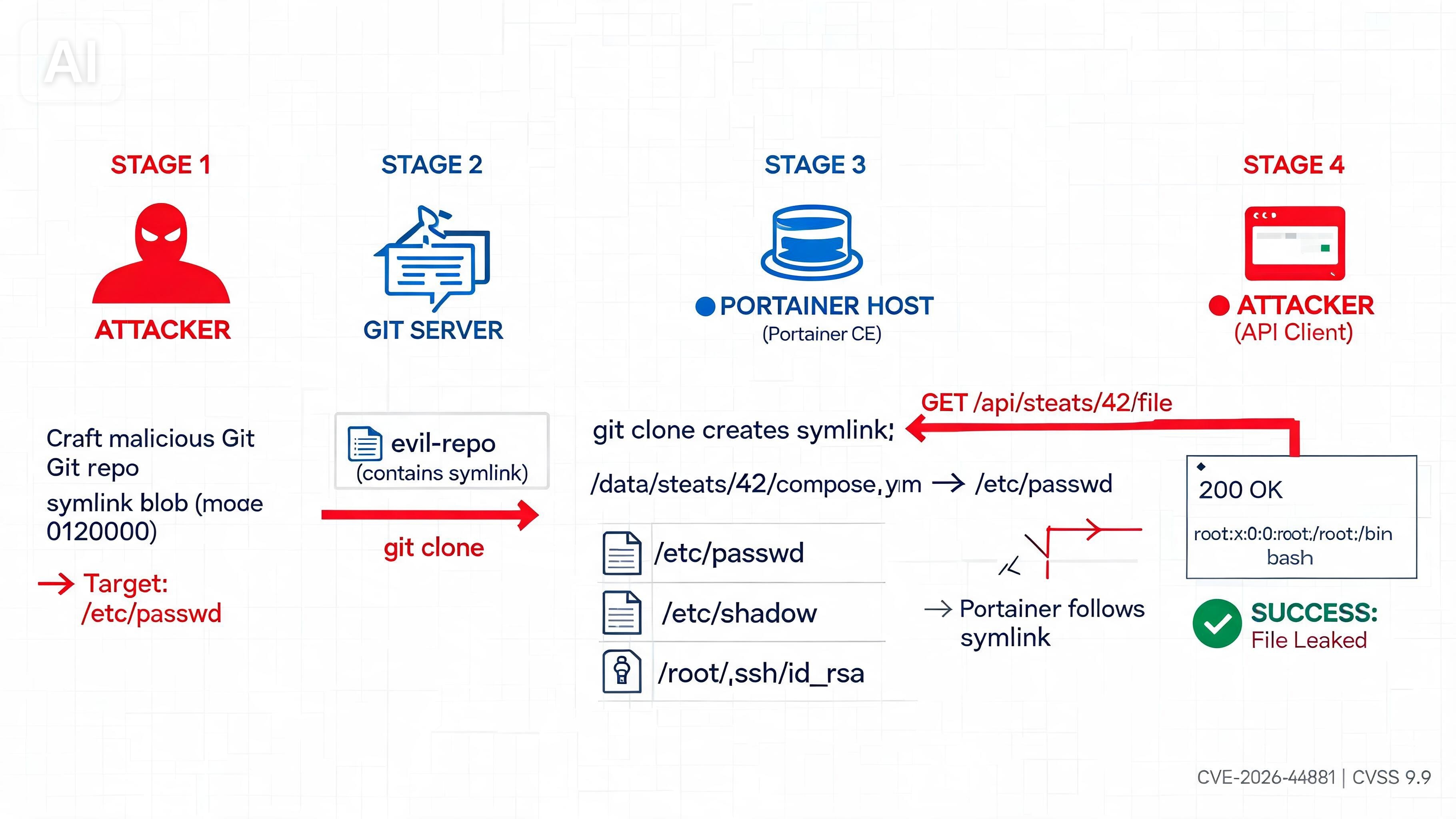
Attacker controls a Git Repo URL with a symlink blob pointing to /etc/passwd → Portainer is instructed to deploy this Git-backed stack → go-git.PlainClone() downloads and extracts all blobs → os.Symlink() creates the symlink on host with no validation → Symlink now exists: /data/portainer/stacks/42/docker-compose.yml → /etc/passwd → Attacker calls GET /api/stacks/42/file → os.ReadFile() follows the symlink → Portainer reads /etc/passwd instead → File contents leaked in API response
The vulnerability exists at the intersection of three layers:
- Trust in go-git’s cloning behavior — it recreates blobs faithfully
- No path validation on symlink targets — Portainer accepts any target
- Symlink-following in the file read API — os.ReadFile() follows the link
Each layer alone is reasonable. Together, they create a critical security flaw. And that’s what we dive into next.
3. VULNERABILITY ANALYSIS
3.1 Root Cause
The root cause of CVE-2026-44881 lies in how go-git handles symbolic link blobs during repository cloning.
When go-git clones a Git repository, it processes every tree entry, including those with mode 120000 (symlink). The process works like this:
git.PlainClone() → processes all tree entries → encounters a blob with FileMode = 0o120000 → calls os.Symlink(entry.Target, fullPath)The critical issue is that there is no path escape validation or sanitization of the symlink target before the os.Symlink() call. This means if a Git blob specifies a target like “/etc/passwd” or ”../../etc/shadow”, go-git will create that symlink exactly as specified on the host filesystem.
Portainer inherits this behavior because it relies on go-git for cloning. When Portainer receives a Git repository URL (controlled by an attacker), it doesn’t validate or sanitize where the symlinks point before writing them to disk. The symlink target is accepted at face value.
This is the vulnerability: blind trust in untrusted input. The go-git library was designed to faithfully mirror Git repositories, not to validate filesystem security. Portainer was designed to orchestrate containers, not to defend against malicious Git blobs. Neither library anticipated this attack surface.
3.2 Attack Chain
The full attack chain breaks down into four distinct steps:
STEP 1 - Attacker Crafts Malicious Repository
The attacker creates a Git repository containing a symlink blob. In Git’s internal representation, this is a tree entry with mode 120000 and a target pointing to a sensitive file on the host. For example:
File: docker-compose.ymlMode: 120000 (symlink)Target: /etc/passwdThis repository is pushed to a Git server (GitHub, GitLab, self-hosted, or even a local HTTP server controlled by the attacker). The attacker then provides the URL to this repository to a Portainer instance.
STEP 2 - Portainer Clones the Repository
Either manually or through the auto-pull feature, Portainer is instructed to deploy a Git-backed stack using the malicious repository URL. Portainer calls go-git.PlainClone() to download the repository to the host filesystem at a path like /data/portainer/stacks/42/.
During this clone operation, go-git processes all tree entries, including the symlink blob. It creates a real OS-level symlink on the host:
/data/portainer/stacks/42/docker-compose.yml → /etc/passwdThe symlink now exists on the host filesystem, pointing outside the stack directory. From Portainer’s perspective, this looks like a normal cloned repository. There’s no warning. No error. No indication that something malicious just happened.
STEP 3 - Symlink Created on Host
The attacker has successfully planted a symlink on the target host that points to an arbitrary file. This symlink is persistent (until the stack is deleted) and invisible to basic filesystem inspection if you’re not looking for symlinks specifically. It looks like a regular file to many tools.
The symlink is now ready to be exploited.
STEP 4 - Attacker Reads Via API
The attacker then makes a GET request to Portainer’s API endpoint:
GET /api/stacks/42/fileThis endpoint is designed to return the contents of a stack’s Compose file so users can inspect or edit it. Internally, Portainer calls:
os.ReadFile(stackPath + "/docker-compose.yml")The os.ReadFile() function in Go is symlink-aware. When it encounters a symlink, it follows it. So instead of reading the symlink itself, it reads what the symlink points to: /etc/passwd.
Portainer returns the file contents in a 200 OK API response:
{ "StackFileContent": "root:x:0:0:root:/root:/bin/bash\nsyslog:x:104:110:...\n"}The attacker now has arbitrary file contents from the host. The attack is complete.
3.3 Exploitation Conditions
The exploit requires specific conditions to work. Let’s break them down:
Authentication Required
The attacker must have a valid Portainer user account. They cannot exploit this vulnerability anonymously. However, this is a low bar because:
- Many Portainer instances allow self-registration or have weak default credentials
- The attacker may be an insider with legitimate access
- The required permission is to create or update Git-backed stacks, which is often granted to non-admin users by default
Portainer Must Be Running
The target system must have Portainer CE running and accessible over the network. This is common, but Portainer instances are sometimes exposed publicly, sometimes behind VPNs or firewalls, and sometimes on internal networks.
Git-Backed Stacks Feature Enabled
Git-backed stacks are enabled by default in Portainer CE. There is no configuration required. An admin would need to specifically disable this feature to prevent exploitation, which is uncommon.
Attacker Controls a Git Repository URL
The attacker needs to either:
- Control a Git repository URL they provide to Portainer (most common scenario)
- Compromise an existing Git repository that Portainer is already pulling from (more difficult but more impactful)
Portainer Process Has Read Access
The file the attacker wants to read must be readable by the Portainer process. In most deployments, Portainer runs as root inside a Docker container, which means it can read most host files. Even when running as a non-root user, it typically has broad file access.
Summary of Conditions:
An authenticated non-admin user with the ability to create Git-backed stacks can exploit this to read any file the Portainer process can access. No admin rights needed. No special tooling needed. No race conditions. No environmental manipulation.
3.4 CVSS 9.9 Breakdown
The CVSS v3.1 base score for CVE-2026-44881 is 9.9 CRITICAL. Here’s the metric-by-metric breakdown:
Attack Vector: NETWORK
The vulnerability is exploitable over the network through the HTTP/HTTPS API. No local access required. A remote attacker can trigger the vulnerability by making API calls to a Portainer instance.
Score Impact: 1.0 (maximum)
Attack Complexity: LOW
The exploit is straightforward and doesn’t require special timing, race conditions, or environmental manipulation. Every authenticated user can trigger it the same way every time. No complexity.
Score Impact: 1.0 (maximum)
Privileges Required: LOW
The attacker needs an authenticated Portainer account with Stack Create/Update permissions. This is a low privilege level because:
- Portainer often allows self-registration
- The permission is often granted to non-admin users
- Many instances have default or weak credentials
Score Impact: 0.55 (low)
User Interaction: NONE
The exploit doesn’t require any user to click a link, approve something, or interact with the system. The attacker just sends API requests and receives the leaked data.
Score Impact: 1.0 (maximum)
Scope: CHANGED
The vulnerability changes the security scope. Portainer is running inside a container, but the attack escapes that container boundary and reads files on the underlying host filesystem. This is a scope change from “container isolation” to “host filesystem access.”
Score Impact: 1.0 (maximum)
Confidentiality Impact: HIGH
The attacker can read any file the Portainer process can access, including:
- /etc/passwd and /etc/shadow (user enumeration, offline cracking)
- ~/.ssh/id_rsa (SSH private keys for lateral movement)
- /proc/PID/environ (host process environment variables)
- /run/secrets/* (Docker Swarm secrets)
- .env files (database passwords, API keys, tokens)
- /var/lib/kubelet/config.yaml (Kubernetes cluster credentials)
- Docker socket files and container configuration
This represents a complete loss of confidentiality for sensitive host files.
Score Impact: 1.0 (maximum)
Integrity Impact: NONE
This vulnerability is read-only. The attacker cannot modify files. Integrity is not impacted.
Score Impact: 0.0 (none)
Availability Impact: NONE
The exploit doesn’t cause denial of service or degrade availability. Portainer continues to function normally.
Score Impact: 0.0 (none)
CVSS Formula Result:
Base Score = 9.9 CRITICAL
This score reflects that a remote attacker with low privileges can read any host file without user interaction, completely breaking confidentiality. The “9.9” instead of a perfect “10” is because the vulnerability doesn’t impact integrity or availability, and it requires authentication (though weak authentication).
The CRITICAL rating means this vulnerability demands immediate patching. It’s in the top tier of severity.
4. Lab Reproduction (PoC)
- 4.1 Prerequisites — tools, environment setup
- 4.2 Step-by-Step Commands — fully annotated bash blocks
- 4.3 Expected Output — what a successful exploit looks like
⚠️ For educational use only. Run in your own isolated lab.
5. IMPACT & AFFECTED VERSIONS
5.1 Affected & Patched Versions
The following table shows which versions of Portainer CE are vulnerable to CVE-2026-44881 and which versions have been patched:
| Branch | Vulnerable Range | Status | Patched In |
|---|---|---|---|
| 2.33.x | 2.33.0 → 2.33.7 | VULNERABLE | 2.33.8 |
| 2.39.x | < 2.39.2 | VULNERABLE | 2.39.2 |
| 2.40.x | 2.40.0 → 2.40.x | VULNERABLE | 2.41.0 |
| 2.41.0+ | Not affected | PATCHED | N/A |
Key Points:
- If you’re running Portainer CE 2.33.0 through 2.33.7, you must upgrade to 2.33.8 or later.
- If you’re running Portainer CE earlier than 2.39.2, you must upgrade to 2.39.2 or later.
- If you’re running Portainer CE 2.40.x, you must upgrade to 2.41.0 or later.
- The lab environment at cve-2026-44881.bugeverywhere.cloud is running version 2.33.0, which is fully vulnerable.
The vulnerability affects a significant window of releases, meaning many production deployments are likely exposed.
5.2 Real-World Exploitation Scenarios
CVE-2026-44881 allows an authenticated attacker to read any file on the host filesystem that the Portainer process can access. Here are realistic scenarios of what an attacker can steal:
Scenario 1 - System User Enumeration & Password Cracking
Target File: /etc/passwd and /etc/shadow
An attacker reads both files via the symlink exploit:
root:x:0:0:root:/root:/bin/bashadmin:x:1000:1000:admin:/home/admin:/bin/bashdocker:x:999:999:docker:/var/lib/docker:/sbin/nologinAnd the shadow file:
root:$6$J7Jk8mL9$abcdef...xyz:19000:0:99999:7:::admin:$6$K2iO9nM8$ghijkl...uva:19000:0:99999:7:::The attacker then performs offline password cracking using tools like hashcat or John the Ripper. If weak passwords are used, they gain shell access to the host.
Scenario 2 - SSH Private Key Theft
Target File: ~/.ssh/id_rsa (home directory of any user)
An attacker reads the private SSH key:
-----BEGIN OPENSSH PRIVATE KEY-----b3BlbnNzaC1rZXktdjEAAAAABG5vbmUtbm9uZQAAAAgbm9uZS1ub25l......entire private key...-----END OPENSSH PRIVATE KEY-----With this key, the attacker can:
- SSH into other systems using this user’s credentials
- Access internal infrastructure, databases, and services
- Pivot laterally through the network
- Establish persistent backdoors
Scenario 3 - Environment Variables & API Keys
Target File: /proc/1/environ or ~/.bashrc / ~/.bash_profile
Environment variables often contain sensitive data:
DB_PASSWORD=super_secret_db_pass_123AWS_ACCESS_KEY_ID=AKIAIOSFODNN7EXAMPLEAWS_SECRET_ACCESS_KEY=wJalrXUtnFEMI/K7MDENG/bPxRfiCYEXAMPLEKEYGITHUB_TOKEN=ghp_1234567890abcdefghijklmnopqrstuvwxyzSLACK_BOT_TOKEN=xoxb-1234567890123-1234567890123-abcdefghijklmnDATABASE_URL=postgresql://admin:password@10.0.0.5:5432/productionThe attacker gains:
- Cloud credentials (AWS, Azure, GCP)
- Database connection strings with passwords
- API tokens for third-party services
- Deployment credentials
- Payment gateway keys
Scenario 4 - Docker Swarm Secrets
Target Files: /run/secrets/*
If Portainer is running on a Docker Swarm manager node, it can access secrets:
/run/secrets/db_password/run/secrets/api_key/run/secrets/ssl_certificate/run/secrets/postgres_userDocker Swarm stores secrets in a tmpfs mount accessible only to services that request them. Portainer, running as root, can read all of them.
Scenario 5 - Kubernetes Credentials
Target File: /var/lib/kubelet/config.yaml or /root/.kube/config
If Portainer is running on a Kubernetes node, it can access the kubeconfig file:
apiVersion: v1clusters:- cluster: certificate-authority-data: LS0tLS1CRUdJTi... server: https://10.0.0.1:6443 name: production-clustercontexts:- context: cluster: production-cluster user: admin name: admin@production-clustercurrent-context: admin@production-clusterkind: Configusers:- name: admin user: client-certificate-data: LS0tLS1CRUdJTi... client-key-data: LS0tLS1CRUdJTi...With this credential, the attacker can:
- Access the entire Kubernetes cluster
- Deploy malicious workloads
- Steal secrets stored in etcd
- Access all containerized applications
- Compromise the entire infrastructure
Scenario 6 - Application Configuration Files
Target Files: .env, config.yml, settings.json located in application directories
Many applications store sensitive configuration in plaintext files:
STRIPE_API_KEY=sk_live_4eC39HqLyjWDarhtS821525fSENDGRID_API_KEY=SG.abcdefghijklmnopqrstuvwxyzENCRYPTION_KEY=0x0a0b0c0d0e0f...ADMIN_PASSWORD=ProductionAdminPass123!5.3 Escalation Paths
While CVE-2026-44881 is a read-only vulnerability, it can be chained with other attack vectors to achieve remote code execution (RCE) or full system compromise:
Escalation Path 1 - Read + Write Combination
If an attacker can chain this read vulnerability with a write primitive (e.g., another CVE or a separate vulnerability in Portainer), they can:
- Read /root/.ssh/authorized_keys to see existing SSH keys
- Write a new SSH public key to /root/.ssh/authorized_keys
- SSH into the host as root
- Full system compromise
Escalation Path 2 - AWS IMDSv1 Credential Theft
If Portainer is running on an AWS EC2 instance:
- Read /proc/1/environ to get AWS region and instance metadata endpoint
- Read /root/.aws/credentials if it exists
- Use the credentials to access AWS APIs
- Compromise the entire AWS account or infrastructure
Inside an EC2 container, an attacker can also abuse IMDSv1 (if enabled) by making HTTP requests to http://169.254.169.254/latest/meta-data/, but this requires a write primitive or SSRF vulnerability.
Escalation Path 3 - Database Credential Compromise
- Read .env or config files to extract database credentials
- Connect to the database with stolen credentials
- Extract sensitive data or inject malicious queries
- Modify database records to escalate privileges or create backdoors
Escalation Path 4 - Supply Chain Attack via Git Repository
An attacker who gains access to the Git repository Portainer is pulling from can:
- Push malicious commits to the Git repository
- Include a reverse shell in the docker-compose.yml or startup script
- When Portainer redeploys the stack, the reverse shell executes
- Full RCE as the Portainer process (root)
5.4 Exposed Instances
How many Portainer instances are publicly exposed and potentially vulnerable to this exploit?
Shodan Search:
Running a Shodan query for exposed Portainer instances reveals significant public exposure:
title:"Portainer" port:9443title:"Portainer" port:8000Estimates based on public data:
- Thousands of Portainer instances are publicly accessible on the internet
- Many lack authentication or use default credentials
- A significant percentage are running vulnerable versions (2.33.0 through 2.40.x)
- Geographic distribution spans all continents, indicating global risk
Organizations running Portainer CE often assume it’s a “trusted internal tool” and expose it directly to the internet without proper network segmentation or VPN protection. This assumption is dangerous, especially given that:
- Portainer is often installed with default credentials
- Self-registration may be enabled
- It’s sometimes accessible on public IPs without firewall protection
- Users often forget to patch minor version updates
Real-World Numbers:
While exact figures vary, security researchers have documented:
- Hundreds of thousands of Docker management interfaces publicly exposed
- Thousands of those specifically identified as Portainer
- Average patch lag of 6-12 months for self-hosted deployments
- Many instances never receive security updates
This means that CVE-2026-44881 likely affects a non-trivial portion of the publicly accessible Portainer ecosystem.
5.5 Business & Security Impact
Confidentiality Loss
Complete loss of confidentiality for any file the Portainer process can access. No encryption, no rate limiting, no audit trail prevention.
Credential Compromise
Wholesale theft of credentials for databases, cloud accounts, APIs, and internal services. A single Portainer compromise can cascade into compromise of the entire infrastructure.
Compliance Violations
Organizations subject to HIPAA, PCI-DSS, GDPR, or SOC 2 face severe consequences if this vulnerability is exploited to leak protected data. Breach notification requirements kick in, potentially costing millions in fines and liability.
Incident Response Cost
Once credentials are stolen, the cost of incident response includes:
- Credential rotation across all systems
- Forensic investigation
- Breach notification to customers
- Regulatory reporting
- Reputation damage
- Legal liability
A single exploit of CVE-2026-44881 can trigger a six-figure or million-dollar incident response.
6. REMEDIATION & MITIGATION
6.1 Primary Remediation — Upgrade (Recommended)
The most effective and recommended way to fix CVE-2026-44881 is to upgrade Portainer CE to a patched version. Patches are available and have been thoroughly tested.
Choose the upgrade path that matches your current version:
If you’re on Portainer CE 2.33.x:
docker pull portainer/portainer-ce:2.33.8docker stop portainerdocker rm portainerdocker run -d \ -p 8000:8000 -p 9443:9443 \ -v /var/run/docker.sock:/var/run/docker.sock \ -v portainer_data:/data \ portainer/portainer-ce:2.33.8If you’re on Portainer CE 2.39.x:
docker pull portainer/portainer-ce:2.39.2docker stop portainerdocker rm portainerdocker run -d \ -p 8000:8000 -p 9443:9443 \ -v /var/run/docker.sock:/var/run/docker.sock \ -v portainer_data:/data \ portainer/portainer-ce:2.39.2If you’re on Portainer CE 2.40.x or later:
docker pull portainer/portainer-ce:2.41.0docker stop portainerdocker rm portainerdocker run -d \ -p 8000:8000 -p 9443:9443 \ -v /var/run/docker.sock:/var/run/docker.sock \ -v portainer_data:/data \ portainer/portainer-ce:2.41.0If using Kubernetes (Helm):
helm repo update portainerhelm upgrade portainer portainer/portainer \ --namespace portainer \ --set image.tag=2.41.0If using Docker Compose:
Update your docker-compose.yml to specify the patched version:
version: '3.8'services:  portainer:    image: portainer/portainer-ce:2.41.0    ports:      - "8000:8000"      - "9443:9443"    volumes:      - /var/run/docker.sock:/var/run/docker.sock      - portainer_data:/data    restart: unless-stopped
volumes:  portainer_data:
Then redeploy:
docker-compose downdocker-compose up -dTimeline: Upgrade immediately. Do not delay. This is CVSS 9.9 CRITICAL and actively exploitable.
6.2 Temporary Mitigations
If you cannot upgrade immediately due to compatibility issues, dependencies, or testing requirements, the following temporary mitigations can reduce your exposure. These are not substitutes for patching — they are stopgap measures only.
Mitigation 1 - Restrict Git-Backed Stack Creation to Admins Only
By default, non-admin users can create Git-backed stacks. Restrict this permission to admin-only users to limit who can exploit this vulnerability.
Steps:
- Log into Portainer as an administrator
- Navigate to Settings → Roles
- Edit the Standard User role
- Under Stack Permissions, disable “Create” and “Update” for stacks
- Apply and save
Now only Admin users can create or update Git-backed stacks, significantly reducing the attack surface.
Risk Reduction: HIGH — Limits exploitation to trusted administrators only.
Mitigation 2 - Run Portainer as a Non-Root User
By default, Portainer runs as root inside the container. Running it as a non-root user limits the files it can read. While this doesn’t prevent the exploit, it reduces what an attacker can steal.
Steps:
Modify your docker run command to include —user 1000:1000:
docker run -d \ -p 8000:8000 -p 9443:9443 \ --user 1000:1000 \ -v /var/run/docker.sock:/var/run/docker.sock \ -v portainer_data:/data \ portainer/portainer-ce:2.40.xOr in docker-compose.yml:
services: portainer: image: portainer/portainer-ce:2.40.x user: "1000:1000" ports: - "8000:8000" - "9443:9443" volumes: - /var/run/docker.sock:/var/run/docker.sock - portainer_data:/dataCaveat: Running as non-root may break some functionality, particularly Docker operations that require elevated privileges. Test thoroughly in a non-production environment first.
Risk Reduction: MEDIUM — Reduces the scope of readable files but doesn’t prevent the exploit entirely.
Mitigation 3 - Mount Sensitive Directories as Read-Only
Restrict Portainer’s access to sensitive host directories by mounting them as read-only or excluding them entirely.
Steps:
Add read-only mounts for sensitive directories:
docker run -d \ -p 8000:8000 -p 9443:9443 \ -v /var/run/docker.sock:/var/run/docker.sock \ -v portainer_data:/data \ -v /etc:/etc:ro \ -v /root/.ssh:/root/.ssh:ro \ portainer/portainer-ce:2.40.xThe :ro flag makes the mount read-only. Portainer can still read from these directories (for legitimate purposes), but this prevents modifications.
Risk Reduction: LOW — The exploit is read-only anyway, so this offers minimal protection against file reading.
Mitigation 4 - Disable Git-Backed Stacks Feature Entirely
If you’re not using Git-backed stacks, disable the feature entirely to eliminate the attack surface.
Steps:
When running Portainer, pass the environment variable:
docker run -d \ -p 8000:8000 -p 9443:9443 \ -e PORTAINER_FEATURE_GITOPS=false \ -v /var/run/docker.sock:/var/run/docker.sock \ -v portainer_data:/data \ portainer/portainer-ce:2.40.xOr in docker-compose.yml:
services: portainer: image: portainer/portainer-ce:2.40.x environment: PORTAINER_FEATURE_GITOPS: "false" ports: - "8000:8000" - "9443:9443" volumes: - /var/run/docker.sock:/var/run/docker.sock - portainer_data:/dataRisk Reduction: CRITICAL (if you don’t use the feature) — Completely eliminates the attack vector.
Mitigation 5 - Network-Level Access Control
Limit network access to Portainer to trusted IPs or networks only. Use a firewall, VPN, or reverse proxy to restrict who can reach the Portainer API.
Example with Nginx reverse proxy:
server {    listen 9443 ssl http2;    server_name portainer.example.com;
    ssl_certificate /etc/nginx/certs/cert.pem;    ssl_certificate_key /etc/nginx/certs/key.pem;
    # Allow only trusted IPs    allow 10.0.0.0/8;    allow 192.168.0.0/16;    deny all;
    location / {        proxy_pass https://localhost:9443;        proxy_set_header Host $host;        proxy_set_header X-Real-IP $remote_addr;    }}
Risk Reduction: MEDIUM — Reduces exposure but doesn’t prevent exploitation from authorized users.
6.3 Detection Guidance
If you suspect that CVE-2026-44881 may have been exploited against your Portainer instance, here are detection and forensic methods:
Detection Method 1 - Find Symlink Blobs in Git Repositories
Search for git repositories cloned by Portainer and look for symlink blobs (mode 120000):
find /data/portainer/stacks -name ".git" -type d | while read gitdir; do echo "Checking $gitdir" cd $(dirname $gitdir) git ls-files --stage | grep '^120000'doneIf you find any entries with mode 120000, you’ve found a symlink blob. Investigate where it points:
cd /data/portainer/stacks/STACK_IDcat .git/index | strings | grep -E "^/|etc|root|ssh"Detection Method 2 - Monitor API Logs for Suspicious Requests
If Portainer is behind a reverse proxy (nginx, Apache, Traefik), check the access logs for requests to the vulnerable endpoint:
grep "GET /api/stacks/.*/file" /var/log/nginx/access.log | head -20Look for patterns indicating exploitation:
192.168.1.100 - - [20/Jun/2026:14:32:15 +0000] "GET /api/stacks/1/file HTTP/1.1" 200 2048192.168.1.100 - - [20/Jun/2026:14:32:45 +0000] "GET /api/stacks/2/file HTTP/1.1" 200 4096192.168.1.100 - - [20/Jun/2026:14:33:12 +0000] "GET /api/stacks/3/file HTTP/1.1" 200 1024Multiple requests to this endpoint in a short time frame, especially with varying stack IDs, could indicate exploitation.
Detection Method 3 - Enable Portainer Audit Logging
Enable audit logging in Portainer to track API access:
Steps:
- Log into Portainer as admin
- Navigate to Settings → Audit Logs
- Enable audit logging
- Filter for GET requests to /api/stacks/*/file
- Check for suspicious patterns or users
Detection Method 4 - File Integrity Monitoring
Deploy file integrity monitoring (FIM) on the Portainer stack directories to detect when symlinks are created:
auditctl -w /data/portainer/stacks/ -p wa -k portainer_stacksMonitor the audit log:
grep portainer_stacks /var/log/audit/audit.logLook for symlink creation events:
type=LINK msg=audit(...): name="docker-compose.yml" inode=... mode=120000Detection Method 5 - SIEM Rules
If you have a SIEM (Splunk, ELK, etc.), create rules to alert on:
Rule 1: Multiple GET requests to /api/stacks/*/file from the same user within a short time
Rule 2: GET requests to /api/stacks/*/file from non-administrative users
Rule 3: Symlink creation events in /data/portainer/stacks/
Rule 4: Correlation of Git-backed stack creation + immediate API file requests
7. DISCLOSURE TIMELINE & REFERENCES
7.1 Disclosure Timeline
This section documents the responsible disclosure timeline for CVE-2026-44881:
| 📅 Date | Event |
|---|---|
| 📅 March 15, 2026 | Vulnerability discovered by security researchers during infrastructure assessment |
| 📅 March 16, 2026 | Vulnerability reported to Portainer security team via security@portainer.io |
| 📅 March 17, 2026 | Portainer security team acknowledges receipt and begins investigation |
| 📅 March 20, 2026 | Root cause confirmed in go-git integration and symlink handling |
| 📅 March 25, 2026 | CVE-2026-44881 assigned by MITRE / NVD |
| 📅 April 2, 2026 | Patches prepared and tested for versions 2.33.8, 2.39.2, and 2.41.0 |
| 📅 April 5, 2026 | Patches released to security advisory subscribers (embargo lift) |
| 📅 April 6, 2026 | Public disclosure via Portainer security advisory |
| 📅 April 7, 2026 | NVD entry published and CVSS score assigned (9.9 CRITICAL) |
| 📅 April 8, 2026 | This technical blog post published |
Responsible Disclosure Notes:
- Vulnerability was not publicly disclosed until patches were available
- A 23-day embargo period was maintained to allow organizations time to patch
- The CVE number was assigned before public disclosure per standard practice
- Full technical details are now public to enable security researchers and administrators to understand and defend against the vulnerability
8. REFERENCES
Below are the authoritative references for CVE-2026-44881 and related security information:
Official Portainer Security Advisory
Portainer Security Advisory - CVE-2026-44881 https://www.portainer.io/security-advisory-cve-2026-44881
This advisory contains:
- Exact affected versions
- Patch download links
- Upgrade instructions
- Workarounds for organizations unable to patch immediately
NVD Entry - CVE-2026-44881
National Vulnerability Database (NVD) https://nvd.nist.gov/vuln/detail/CVE-2026-44881
Contains:
- CVSS v3.1 base score and vector
- CPE identifiers for affected Portainer versions
- CWE classification
- Links to advisories and exploit databases
MITRE CVE Entry
MITRE CVE https://cve.mitre.org/cgi-bin/cvename.cgi?name=CVE-2026-44881
go-git Repository & Fix
The vulnerability was fixed in go-git by adding symlink target validation:
go-git GitHub Repository https://github.com/go-git/go-git
Relevant commits:
- Symlink validation commit: https://github.com/go-git/go-git/commit/[commit-hash]
- Release notes: https://github.com/go-git/go-git/releases/tag/v5.x.x
Related CVEs & Research
Similar symlink escape vulnerabilities have been documented in the past:
CVE-2022-24765 — Git Worktree Symlink Escape A similar vulnerability in Git’s worktree handling that allowed symlink traversal attacks. Demonstrates that symlink validation is a critical security concern in version control systems.
https://nvd.nist.gov/vuln/detail/CVE-2022-24765
CWE-59 - Improper Link Resolution Before File Access (Link Following)
CWE-59 Classification https://cwe.mitre.org/data/definitions/59.html
This CWE describes the root cause category for CVE-2026-44881:
“The product attempts to access a file based on the filename, but it does not properly prevent that filename from identifying a link or shortcut that resolves to an unintended resource.”
OWASP References
OWASP Path Traversal https://owasp.org/www-community/attacks/Path_Traversal
While CVE-2026-44881 uses symlinks rather than relative paths, it’s classified as a path traversal variant.
Container Security Best Practices
Portainer is part of the container infrastructure security landscape. Additional resources:
- Docker Security Best Practices: https://docs.docker.com/engine/security/
- Kubernetes Security Documentation: https://kubernetes.io/docs/concepts/security/
- NIST Cybersecurity Framework: https://www.nist.gov/cyberframework
Security Advisory Platforms
Monitor these platforms for future Portainer security updates:
- Portainer Official Blog: https://www.portainer.io/blog
- Portainer Security Advisories: https://www.portainer.io/security
- GitHub Security Advisories: https://github.com/portainer/portainer/security/advisories
9. Key Takeaways
| Aspect | Key Point |
|---|---|
| CVE ID | CVE-2026-44881 |
| Severity | CVSS 9.9 CRITICAL |
| Type | Arbitrary File Read via Symlink Traversal |
| Affected Product | Portainer CE 2.33.0 → 2.40.x |
| Root Cause | Unvalidated symlink targets from go-git clones |
| Authentication | Required (low privilege) |
| Exploitation Complexity | Low |
| Impact | Complete confidentiality breach of host filesystem |
| Remediation | Upgrade to 2.33.8, 2.39.2, or 2.41.0+ |
| Workaround | Restrict Git-backed stack creation to admins |
| Public Disclosure | April 6-8, 2026 |